Most creators need fewer categories of tools than product roundups suggest: dependable capture, editing, storage and backup, planning, communication, rights records and measurement. Choose the workflow first, then select the least complex tool that performs its part reliably and lets you retrieve your work later.
This is a decision guide, not a list of current product winners. Prices, plans and features change. Test candidates with your own source files and delivery requirements before committing.
Start with jobs and failure costs
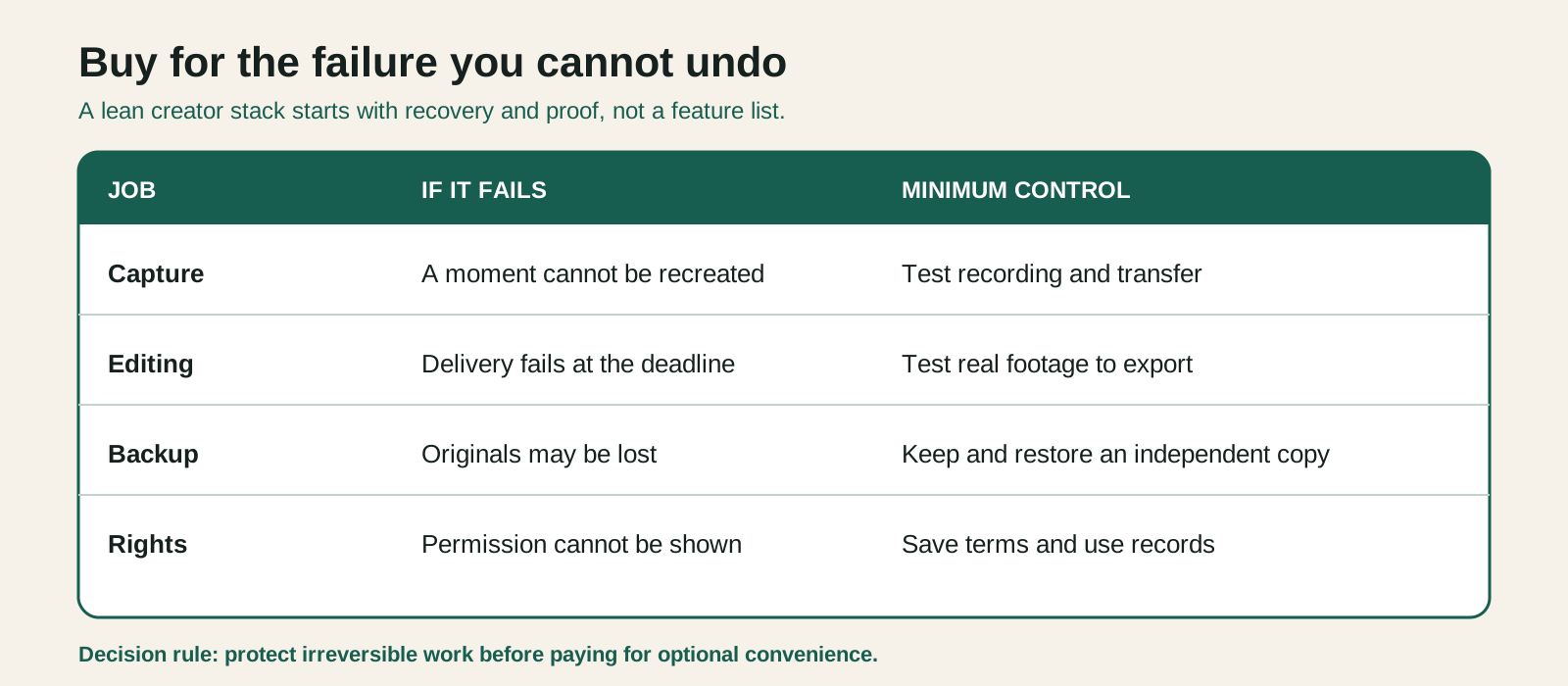
List recurring jobs from idea to archive. For each job, write what happens if the tool fails:
| Job | Minimum capability | Cost of failure |
|---|---|---|
| Capture | records required quality reliably | moment cannot be recreated |
| Edit | handles real formats and captions | missed deadline or degraded output |
| Storage | enough capacity and predictable retrieval | project delay |
| Backup | independent recoverable copy | permanent asset loss |
| Planning | owner, status, deadline and brief | duplicate or blocked work |
| Rights | stores license and permitted use | claim, takedown or costly search |
| Communication | preserves decisions and approvals | revision conflict |
| Measurement | exports useful first-party records | decisions based on anecdotes |
Spend attention where failure is irreversible or expensive. A fancy ideation tool is easy to replace. Lost originals, unclear usage rights or an unrecoverable account are not.
Capture: reliability before cinematic ambition
A current phone may be enough when it records the required framing, duration and audio consistently. Add equipment only to solve a demonstrated constraint: stable support, controllable light, intelligible speech, longer recording, a specific lens or safe remote operation.
Before buying a camera, run a complete test from capture through edit and upload. Check:
- storage per recording session;
- heat, battery and recording limits;
- autofocus and exposure behavior in the real location;
- external audio compatibility;
- file transfer time;
- codec performance on your editing device;
- vertical mounting and monitoring;
- backup procedure before cards are cleared.
The best capture tool is the one you can operate correctly while also presenting, cooking, travelling or supervising the subject.
Audio: improve the source first
Viewers may tolerate ordinary visuals longer than speech they cannot understand. Move the microphone closer, reduce competing noise and record a controlled level before buying restoration software. Monitor a test through headphones and an ordinary phone speaker.
Keep voice, music and effects as separate layers when practical. That gives the editor room to improve balance, create captions and replace licensed music for another destination. A single flattened track can turn a small rights change into a full rebuild.
Editing: test the whole delivery path
Choose software around your real footage, collaboration and outputs. Use a representative project—not a vendor demo—to evaluate:
- import and organization;
- playback performance;
- captions and text workflow;
- audio control;
- vertical and horizontal versions;
- project exchange or handoff;
- export speed and reliability;
- long-term opening and relinking.
A mobile editor can be ideal for fast solo work. A desktop editor can justify complexity for larger projects, precise audio, collaboration or extensive archives. Avoid a forced migration by keeping originals, final masters, captions and decision records outside proprietary project files.
Planning: one source of status
A spreadsheet, board or issue tracker can all work. The minimum record is:
- stable project ID and title;
- owner and current stage;
- primary audience decision;
- due and publication time;
- blocked reason and next action;
- links to brief, assets and approvals;
- review date after publication.
Do not duplicate status across chat, email and three boards. Discussion can happen elsewhere, but one location must answer: what is the next approved action?
Automation is useful only after the manual path is clear. Automating a vague status merely produces faster confusion.
Storage and backup: they are not the same
Primary storage is where you work. Sync mirrors changes, including accidental deletions. Backup preserves recoverable versions independently. CISA's published backup guidance describes a 3-2-1 model: keep multiple copies, use different media types and retain one copy off site.
Adapt that model to the value and sensitivity of your assets. For an active project, you might use local working storage, a versioned cloud backup and a separate offline or provider-independent copy. Encrypt sensitive material and document recovery access.
Test restoration with a sample project. Verify that project files relink, captions open, licenses are readable and the restored export matches expectations.
Rights and source records: plain files beat memory
Every licensed asset should connect to:
- provider and asset identifier;
- exact license or terms accepted;
- acquisition date;
- account or buyer;
- permitted platforms, territory and commercial context;
- project/use;
- receipt or evidence;
- expiry or subscription dependency;
- attribution requirement.
A folder plus structured JSON or spreadsheet can be enough. The critical feature is retrieval during a claim, client request or later reuse. Do not assume the library account will preserve the exact terms forever.
Communication and review: preserve the decision
Chat is fast but poor as the only approval record. Summarize final decisions beside the project: what changed, who approved it, what rights were granted and which version was released.
For visual review, time-coded comments reduce ambiguity. For factual review, reference the sentence and source. For final approval, freeze the candidate version so late edits cannot silently invalidate an earlier sign-off.
Measurement: prefer access and exportability
Native platform analytics are often the most direct source for platform behavior, but access windows and definitions can change. Record definitions, comparison periods and export dates. Preserve the metrics needed for your own decisions rather than collecting everything.
Privacy-conscious site analytics can answer aggregate publication questions without building advertising profiles. The right setup depends on the actual site and jurisdiction; do not install multiple trackers “just in case.” Every script adds performance, privacy and governance work.
Evaluate a tool with a two-week protocol
Use this scorecard on two real projects:
- Job fit: does it solve the stated problem?
- Reliability: did it fail, corrupt, lose or alter output?
- Learning cost: can the operator repeat the workflow under deadline?
- Portability: can you export source, metadata and finished work?
- Collaboration: can another person understand and continue?
- Rights/privacy: are data handling and permitted use acceptable?
- Total cost: subscription, add-ons, storage, migration and time.
- Exit: what happens to projects and access when you cancel?
Write evidence beside each score. “Feels professional” is not evidence. “Opened a 45-minute 4K project without proxies and exported captions as SRT” is.
A lean starter stack
A solo creator can begin with:
- a phone or camera already owned;
- one microphone suited to the main recording situation;
- one editor that passes a real export test;
- structured project folders;
- independent backup;
- one planning register;
- rights and approval records;
- native platform analytics plus privacy-conscious site analytics if a site exists.
Add a tool only when you can name the bottleneck, expected improvement, test and exit plan. Review subscriptions quarterly. Export important data before cancelling, then remove redundant access and integrations.
The point of a creator stack is not to display sophistication. It is to help a small team make accurate, recoverable work without turning every handoff into a search operation.
Related resources
Sources
- CISA: Data Backup Options
- W3C WAI: Making Audio and Video Media Accessible
- W3C WAI: Writing for Web Accessibility
Comparison Matrix